Connector catalog › HexaConnect essentials

Containers and orchestration

Kubernetes

Nodes, namespaces, workloads, networking and configuration of a Kubernetes cluster, with kubectl's permissions.

Installable connector, signed by Massive Dynamic

In pictures

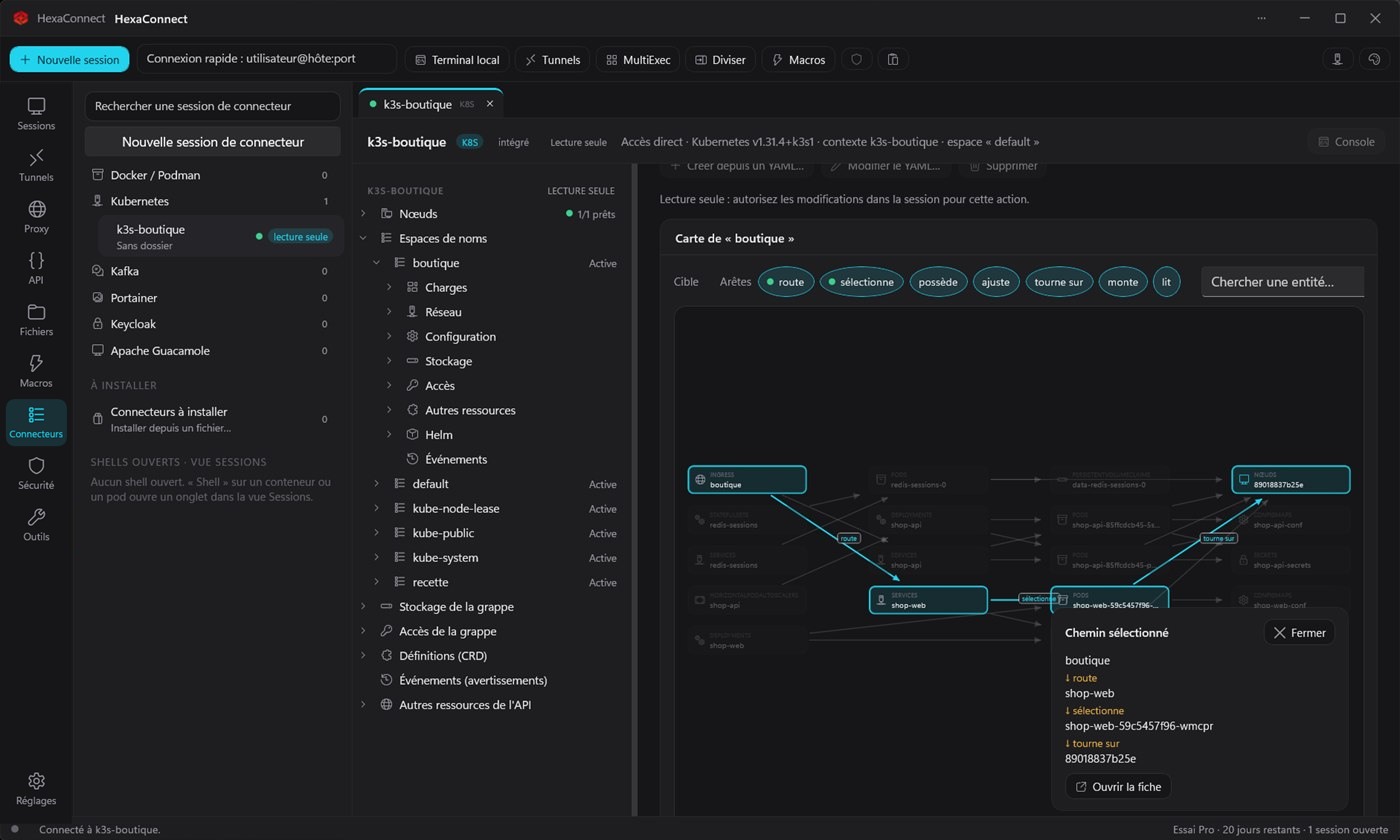
Kubernetes : Map of the boutique namespace: from the Ingress to the node through the shop-web service and pod
Map of the boutique namespace: from the Ingress to the node through the shop-web service and pod Screenshot of HexaConnect against demo servers.
Discovery

What you see

  • Nodes; namespaces: workloads (Deployments, StatefulSets, DaemonSets, Jobs, CronJobs, Pods), networking, configuration, storage, access, Helm, events; CRDs
  • Details: state as kubectl shows it (CrashLoopBackOff, Init:0/1…), containers, conditions, related events, YAML without managedFields
  • Cluster map in tiles: one node per tile, gauges if metrics-server is present, one colored square per pod
  • Secrets decoded and masked, revealed one by one
Pro

Everyday actions

  • Rolling restart, replicas +1 / −1
  • Delete a pod, run a CronJob
  • Cordon / uncordon a node
  • Drain, honoring disruption budgets, name to retype

Each action requires allowing changes on the session, is confirmed and goes to the log (and to the SIEM if one is configured).

Console

Pod logs followed (per container, and the previous container's), shell in a tab, port forwarding on 127.0.0.1, also from a service.

Access

A kubeconfig context (KUBECONFIG or ~/.kube/config), with the same permissions as kubectl: token, client certificate, “exec” plugins (aws, gcloud, kubelogin…), the kubeconfig's certificate authority and proxy, or a jump through an SSH session to a private API server.

Plan

Read access with Discovery, actions with Pro or Enterprise. An Enterprise policy can enforce read-only.

Distribution

Signed package, installed from the app (assistant, Settings or catalog) and updated through the catalog. A computer that used it received it with the HexaConnect update, sessions unchanged.

Documentation

Good to know

Context import: one session per context, read-only; a “prod” context is marked protected. Not offered: YAML editing, file copy. Kubernetes is also audited read-only by the Security tab.

Connector documentation →

Trademarks mentioned belong to their respective owners; their mention implies neither partnership nor endorsement.